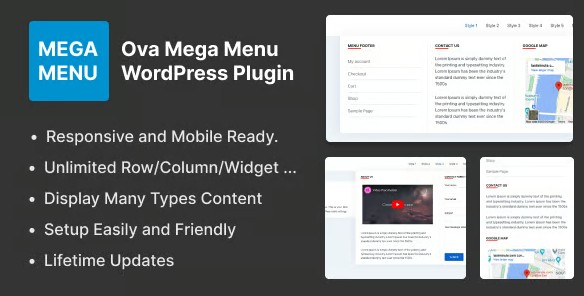
Ova Mega Menu is a lightweight WordPress plugin that turns plain dropdown navigation into rich, well-organized mega menus. Build them visually with drag & drop, attach them to any menu item, and give visitors a faster way to find what they are looking for, all without writing a single line of code.
Visual Builder With Full Layout Control
Assemble your menu from rows and resizable columns directly in the WordPress dashboard. Choose between a full-width or container-based display, set percentage-based column widths, and arrange your content exactly the way you want it. What normally requires custom HTML and CSS becomes a few minutes of visual work.
A Dedicated Layout for Every Device
Most mega menus simply shrink on smaller screens. Here you can design separate layouts for desktop, tablet and mobile and define your own responsive breakpoints for each. The result is navigation that looks intentional on every screen, not squeezed or broken.
More Than Just Links
Each column can hold far more than a list of URLs. Add formatted text with the WYSIWYG editor, headings, shortcodes, existing WordPress menus or custom menu items, and even full Elementor templates for unlimited design possibilities. Promote featured products, highlight articles or place a call to action right inside your navigation.
Styling Without the Hassle
Fine-tune position, spacing, backgrounds, borders, rounded corners, shadows and typography from simple settings panels, at both the global and the element level. Google Fonts are supported, and a built-in custom CSS editor is there when you want finer control. Choose whether menus open on hover or click to match your site’s behavior.
Easy to Attach, Light on Performance
Create a mega menu once, copy its shortcode into any menu item, and it goes live instantly. The plugin generates clean, optimized CSS and can load styles from an external file, keeping your pages light while the menus look rich. It works with any well-coded WordPress theme, and is translation ready and RTL friendly.
Perfect For
Online stores, magazines and blogs, corporate sites, portfolios, agencies and large directories, in short, any website with enough content to deserve clear, structured navigation.